P2 serial
Source
This content is based on Cyanview's official manuals. Always check the official page for the latest information and precise specifications.
https://support.cyanview.com/docs/Integrations/Panasonic/P2-serial
https://support.cyanview.com/docs/Integrations/Panasonic/P2-serial

Supported Models
- AG-HPX300
- AG-HPX500
- AJ-HPX2700
- AJ-HPX3100
- Generic (any other AJ-HPX camera fitted with a Hirose 10-pin connector)
note
All AJ-HPX cameras with the Hirose 10-pin connector are supported. If your model is not listed, select the Generic model. The Generic model assumes all features are available, so depending on the camera, some features may not be available or may not work properly.
Supported Control Features
Supported features vary by model. The AG-HPX300 and AG-HPX500 only support the basic feature set; gamma, black gamma, saturation, white clip, knee, matrix, and detail cannot be controlled.
| Feature | AG-HPX300 | AG-HPX500 | AJ-HPX2700 | AJ-HPX3100 | Generic |
|---|---|---|---|---|---|
| OSD | ✓ | ✓ | ✓ | ✓ | ✓ |
| Gain (M/R/B) | ✓ | ✓ | ✓ | ✓ | ✓ |
| Pedestal (M/R/B) | ✓ | ✓ | ✓ | ✓ | ✓ |
| Gamma (M/R/B) | - | - | ✓ | ✓ | ✓ |
| Black gamma | - | - | ✓ | ✓ | ✓ |
| Saturation | - | - | ✓ | ✓ | ✓ |
| White clip | - | - | ✓ | ✓ | ✓ |
| Knee | - | - | ✓ | ✓ | ✓ |
| Matrix | - | - | ✓ | ✓ | ✓ |
| Detail | - | - | ✓ | ✓ | ✓ |
| ND filter | - | Read-only | - | - | ✓ |
| Auto white balance | ✓ | ✓ | ✓ | ✓ | ✓ |
| Iris | ✓ | ✓ | ✓ | ✓ | ✓ |
| Shutter | ✓ | ✓ | ✓ | ✓ | ✓ |
Connection
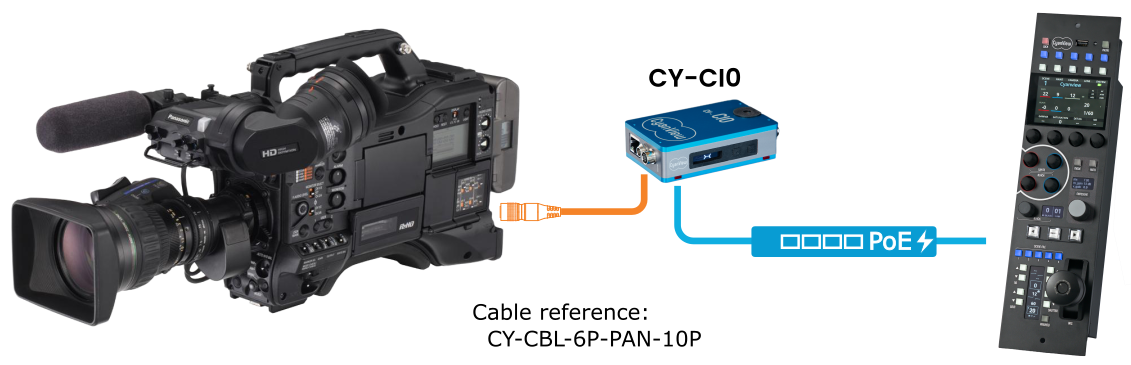
The camera is controlled over a serial link. A CY-CIO or CY-RIO interface is required. Use the CY-CBL-6P-PAN-10P connection cable (see the Cable Catalog).
Setup Procedure
To add the camera on the RCP or RIO, do the following:
- Select brand: Panasonic
- Select model: Serial
- Select the CI0 or RIO port the camera is connected to
