Sony Lanc
https://support.cyanview.com/docs/Integrations/Sony/SonyLanc

Supported Cameras
New Sony cameras still have the LANC connector, and on some models, such as the Sony ILME-FX6, it is the only way to get menu navigation and tally. So LANC is still used today for these functions only, while other controls are handled by other protocols. In that case, a second camera is created on the RCP for the LANC controls only.
- All Sony camcorders with a LANC connector: PXW-FS5, PXW-FS7, PXW-Z90, etc.
- Sony FX6 (this camera can also be controlled over IP)
A list of compatible older Sony cameras is available on Sony's website: RM30BP compatibility (PDF).
Supported Controls
| Control | Sony LANC |
|---|---|
| Exposure: Iris, Gain, Shutter and ND Filter | ✓ |
| White balance: AWB/ATW | ✓ |
| Lens: Zoom, Focus | ✓ |
| Record: REC key press | ✓ |
| Menu navigation: menu and Fn button key presses | ✓ |
:::caution Important Control is unidirectional (it only sends key presses) and rather slow, so the RCP does not display any camera status. :::
Wiring
A LANC camera can be controlled directly via port 2 of a CI0/RIO LAN (local) or a RIO WAN (local or remote).

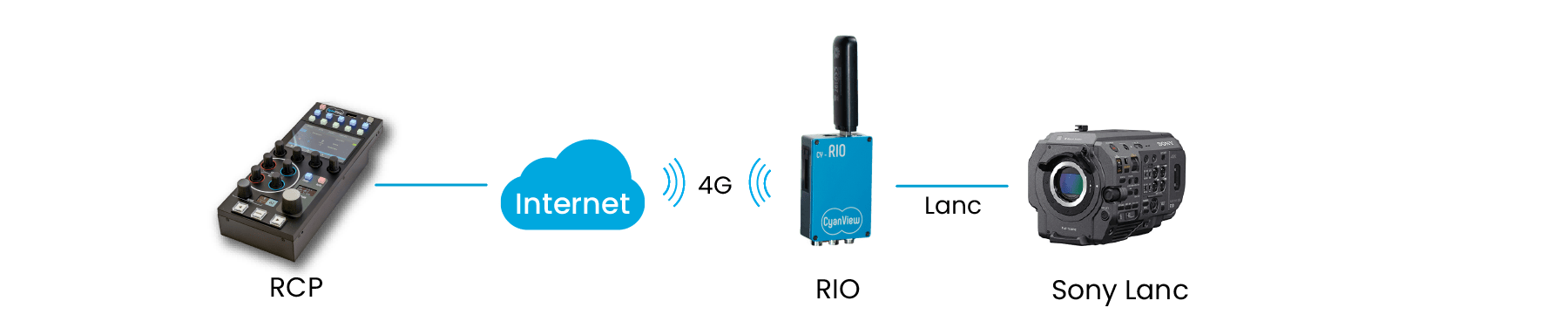
Use a CY-CBL-6P-LANC-03 LANC cable (see the Cable Catalog).
Camera Setup
Map the dial to gain so that gain can be controlled from the RCP.
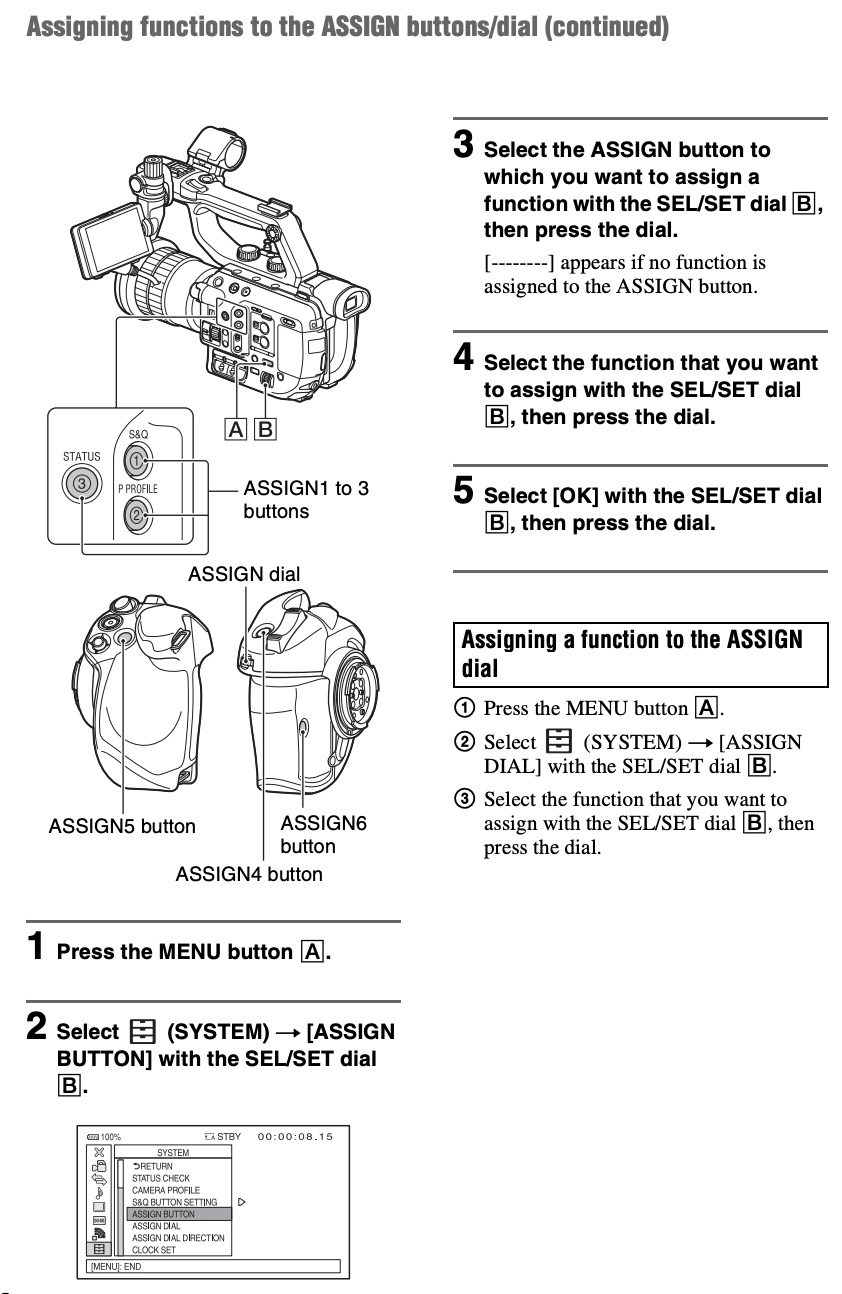
Both the Sony RM30BP and the Cyanview gain control act on the function mapped to the dial:
- If the dial is mapped to gain, the Cyanview gain control adjusts the gain.
- If the dial is mapped to variable ND, the Cyanview gain control adjusts the variable ND.
RCP/RIO Setup Steps
- Connect the camera to port 2 of the CI0/RIO with a CY-CBL-6P-LANC-03 cable
- Add the camera in the RCP configuration UI
- Select brand: Sony
- Select model: LANC
- Select the CI0/RIO the camera is connected to (only port 2 is shown)
Going Further
Advanced Shading
You can combine camera control with a 3D LUT processor or color corrector.
Adding a VP4 provides multi-matrix and extended shading capabilities (detail, coring, etc.) beyond those of a typical LUT box or color corrector.
Tally
Not all cameras have tally; some models support tally (in the viewfinder) and some don't. Check the RM30BP compatibility list for compatible models (search for "tally").
For cameras that do not support tally, an unused CI0/RIO port can act as a tally output using a CY-CBL-6P-PWR cable driving an LED. See the Tally configuration page.
External Lens Control (RIO)
You can control the iris with the Lens block:
- With a Fujinon or Canon motorized lens, use the lens control setup (see also Generic Lens).
- With a non-motorized lens, you can integrate Tilta motors.