CI0 Network Connection & WiFi
Source
This content is based on Cyanview's official manuals. Always check the official page for the latest information and precise specifications.
https://support.cyanview.com/docs/Manuals/CI0/CI0Manual
https://support.cyanview.com/docs/Manuals/CI0/CI0Manual
Network Configuration
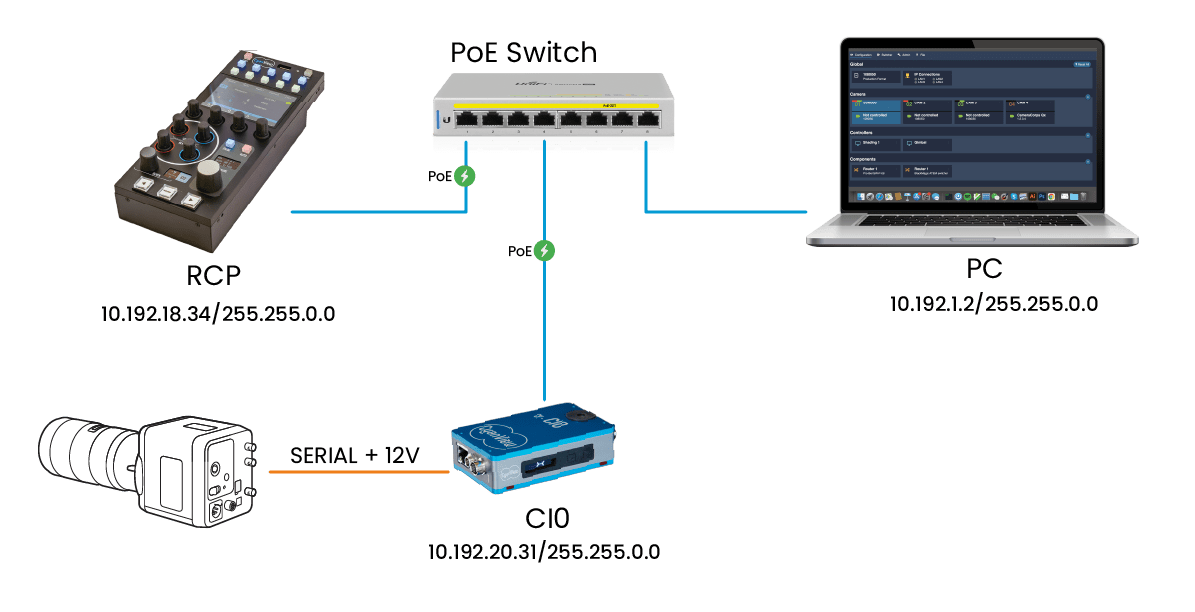
CI0 is plug-and-play by design, engineered to avoid conflicts. Its IP address is fixed based on its serial number, and it is automatically discovered and displayed in the RCP interface through the discovery process.
CI0 relies on a TCP/IP network with no port limitation to communicate with other devices.
Required ports:
- 3838/UDP: For discovery
- 1883/TCP
- Random port: For serial communication
WiFi

Using a TP-Link nano router, you can control your camera over WiFi. See Wireless for the setup.