RMA (Return/Repair) Procedure
https://support.cyanview.com/docs/RMAProcedure
Cyanview devices are designed and produced with great care and carefully tested, but a defect may still appear. Product returns are covered by Cyanview's warranty and return policy described below.
Return process
:::info Returns from the US For returns from the US, Cyanview provides the shipping label so that customs is informed the package is a repair, avoiding unnecessary taxes. :::
- Try troubleshooting first: Review the troubleshooting guide.
- Submit an RMA request form: If the issue isn't resolved, download the RMA Request Form (PDF), fill it in completely, and send it to support@cyanview.com.
- Wait for a reply from Cyanview: You will receive one of the following:
- An RMA document with an identification number and return instructions
- Follow-up questions about the fault or your setup (you may be asked to provide remote access to the device before the RMA document is issued)
- Sign and return the RMA document: Adapt it if needed, sign it, and email it back to support@cyanview.com.
- Ship the device: Follow the shipping instructions listed on the RMA document.
- Quote for out-of-warranty repairs: If the fault is outside the warranty scope, Cyanview will send a quote for repair or replacement.
- Receive the replacement: Cyanview will ship back a working device.
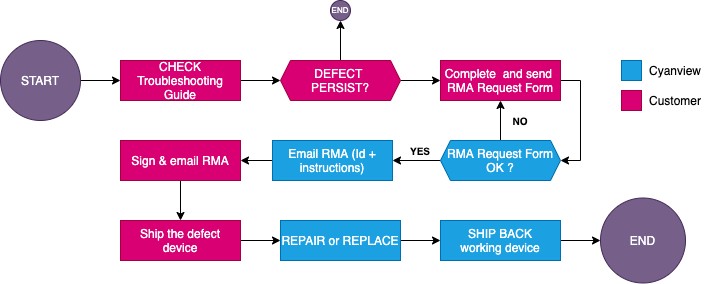
Cyanview's warranty and returns policy
Warranty and liability
Products are warrantied against manufacturing defects for one year from the date of purchase. Cyanview's response will be repair, replacement, or issuance of a credit memo, at Cyanview's discretion.
Damage resulting from use, accidents, or normal wear and tear is not covered under warranty. Cyanview is not liable for incidental or consequential damages relating to the use of its products. Returns or replacements may be subject to shipping, handling, replacement, and/or restocking fees.
Return Merchandise Authorization (RMA)
Before requesting a return authorization, consult Cyanview's troubleshooting guide and try to identify the issue. Many problems can be resolved in a few simple steps without starting the return process.
All return authorization requests must be submitted on the official Cyanview RMA Request Form. When emailing the form to support@cyanview.com, copy your inside sales representative.
:::caution Important deadlines and fees
- You must obtain an RMA number from Cyanview before returning a product. Products sent without an RMA number will be returned to the sender, and a 10% repackaging/restocking fee may be charged.
- Returns must be received by Cyanview within 14 days of receiving the RMA number.
- If the received product does not exhibit the defect described in the authorization, the return authorization is rejected, the product is returned without credit, and a 10% repackaging/restocking fee may be charged.
- Returns that do not meet the policy requirements (labeling, routing guide compliance, packaging, and authorization) are subject to a non-conformance charge defined by Cyanview. :::
Returns outside the warranty period
If the warranty period has ended, or if the cause of the damage is not covered under warranty, Cyanview will provide a repair quote and begin the repair once a purchase order has been received.
Cases not covered by warranty
- Products that have not been updated to the latest firmware
- Water damage (unless verified by technical support)
- Damage caused by user error/mishandling